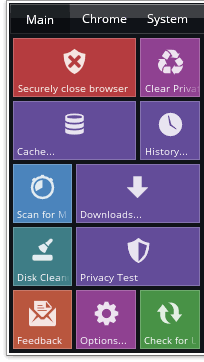
The Click&Clean web browser extension is a Private Data Cleaner for Google Chrome web browser that helps you clean up your private browsing data, thereby protecting your data security, data privacy, and keeping you safe online. It's one of the top-rated web browser extensions in the Chrome Web Store and is actively used by over three million home users, small business owners, and anyone who cares about their data security, data protection, data privacy, and cybersecurity.
Why should I use Click&Clean? Your web browser and system keep tracks of your Computer and Internet activity. Websites and apps may gather cookies or otherwise collect sensitive personal data about you. What's the risk? Anyone with access to your sensitive personal data may use it for their own selfish purposes, for example share your private data with advertisers. By using the Click&Clean web browser extension, you can protect your data privacy, data security, and online privacy. This is one of the first cybersecurity measures that sounds very simple and maybe even trite - "Less browsing data, less problems!"
How is Click&Clean different from similar software? Usually, when you run any other cleaning applications, an error message will prompt you to close Chrome to complete the deletion. With the Click&Clean app you don't need to close your browser, because it uses built-in Chrome capabilities together with an advanced smart-cleaning techniques. The cleaner app allows you to perform safer and more deep cleaning without disturbing your work and does all that with one click! Private Data Cleaner also gives you the option to save your browsing data to an HTML file before deleting that data.
I'm running porn mode..sorry, Incognito mode, do I still need to use Click&Clean? Yes. On the Chrome Help site we can read the following warning: The web pages you visit may still hold records of your visit. Any temporary files saved to your computer will still remain on your computer! View full article: Chrome Help > Incognito Mode
Private Data Cleaner Features. Click&Clean web browser extension for Chrome has a very powerful set of features and yet easy-to-use! It's designed for everyone, with all levels of users in mind, from housewives to experienced professionals. The following are the main features of Click&Clean in a nutshell:
You can choose one of the predefined cleaning modes: Low - Medium - High and Dev mode - an advanced mode for experienced users and developers.
You can remove your browsing data from the beginning of time or from a certain period of time: from the past 1-24 hours, from the past week or choose any date and time you wish.
You can delete all your private data at once or just a specific item: Delete Browsing History - Delete Download History - Empty the Cache - Delete Cookies - Clear Saved Passwords - Clear Saved Form Data - Delete Local Storage - Delete WebSQL Databases - Delete Indexed Databases - Delete File Systems - Empty Application Cache; Delete Plug-in Data; etc.
Private Data Cleaner Download. You can download and install Click&Clean from Chrome Web Store or right on this page - It's Free, Fast and Secure! To do this, just click on "Add to Chrome" button below, then hit on "Install" to start downloading and installing or "Cancel" to cancel installation. Once the Cleaner app is added to your Chrome, you can start using it right away, you don't need to restart your PC or relaunch Chrome. By downloading and installing Click&Clean, you agree to our privacy policy.
To install Click&Clean web browser extension to Google Chrome™ or Chromium manually, from our website:
1. Download the latest extension package as CRX file. 100% clean and safe, scanned by Virus Total.
2. For security reason, you can check downloaded file size and hash. File size: 420KB / 430828 bytes,
hash - SHA256: b6226bcacd29e660a6952
3. Open the Chrome extensions page chrome://extensions and enable "Developer mode" at the top right. Drag and drop downloaded CRX file into the extensions page to add the extension to Google Chrome™ or any Chromium based browser.