History Eraser is a free and easy to use application for Chrome and Opera browsers. It allows you to easily delete your browsing history and prevent others to access and know what websites you've visted before. History Eraser is designed to use for both beginners and experienced computer professionals. You will enjoy the available private data protection features and very simple and neat interface. History Eraser can work on all desktop platforms: Windows, Mac, Linux and Chrome OS and is one of the best cleaning tools available for a Chromebook PC.
Pre-configured cleaning modes: Easy, Medium, Hard and an additional Dev mode for the developers and professionals. This lets you quickly and accurately tune up for even more performance.
Instant cleaning. You can launch History Eraser with just 1-click on "Eraser" button and quickly delete all your private data or just a portion, collected during a specific period of time.
Smart notifications. If you forget to remove your private data on time, History Eraser can notify you when it's time to perform a cleaning up.
View, edit and backup your browsing history. History Eraser includes a History Explorer that helps you explore, backup or delete your browsing history in a more convenient way. Also, you can get more detailed info about web sites you've visited.
Context menu integration gives you an quick and easy access to the advanced features like "Forget this page" - removes a data stored on your computer by a website and closes a tab, "Securely search for Google" - performs a search for a selected text using a secure https connection, "Open any links anonimously" - removes referrer information.
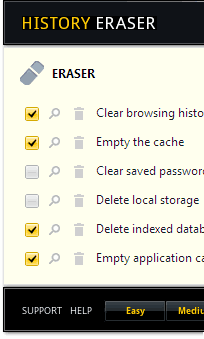
All options can be easily configured using simple selections. The following options are available: Clear browsing history - Clear download history - Empty the cache - Delete cookies - Clear saved passwords - Clear saved form data - Delete local storage - Delete WebSQL databases - Delete indexed databases - Delete file systems - Empty application cache - Delete plugin data.
Advanced Extra Features: Close browser after cleaning - Close all tabs before cleaning - Reload all active tabs after cleaning - Play sound when task finished - Prevent access to the default history page - Add Eraser commands to context menu - Remove items from your Google Web History - Stop syncing and clear all synced browser data - Enable secure search over SSL - Turn on notifications.
History Eraser is compatible with many Browsers. You may choose to install the extension for Google Chrome™ or Opera web browser. History Eraser for Google Chrome™ is compatible with other Chromium based browsers like Microsoft Edge™, SRWare Iron, Vivaldi, Comodo Dragon, Torch, etc. You can download and install History Eraser from Chrome Web Store or Opera Add-ons Gallery. It's Free, Fast and Secure!
You can download and install History Eraser from Chrome Web Store. Once History Eraser is added to your Google Chrome™ or another Chromium based browser, you can start using it right away, just push on the Eraser icon and let the History Eraser do all the cleaning work!
Note: because of a new Google policies were in effect from August 27, 2020, any developers or businesses, related accounts, or their affiliates are prohibited to release on Chrome Web Store two or more applications that provide the same functionality, for example for clearing browsing data, even if the user experience or code are not identical!?
Unfortunatelly, because of such policies we've been forced to hide History Eraser extension from Chrome Web Store listings. A half of million active users and about ten years in the Chrome Web Store.
Currently, as a workaround, you can download zip archive and load History Eraser manually. We hope that the company will update the Spam policies with more reasonable clarifications and people can install useful extensions again.
You can download and install Histpry Eraser from Opera Add-ons Gallery. Once History Eraser is added to your Opera we browser, you can start using it right away, you do not need to restart your PC or relaunch your browser.
To install History Eraser extension to Google Chrome™ or Chromium manually, from our website:
1. Download the latest extension package as ZIP file. 100% clean and safe, scanned by Virus Total.
2. For security reason, you can check downloaded file size and hash. File size: 402KB / 412377 bytes, hash - SHA256: f12958d8a45778d2a25de
3. Open the chrome://extensions page and turn-on Developer Mode by clicking the Developer Mode switch.
4. Click the "Load Unpacked" button and select the extension directory.
We always welcome your feedback, suggestions and constructive criticism to improve the overall quality of the History Eraser and related security and privacy software.